

Update regarding Overdue Notices email
Last month, we advised that over the coming weeks you would start receiving emails from Resolution Life advising you of clients who have:
• Missed a payment
• Are at risk of lapsing or
• Who have lapsed.
From 6th May 2024, if your clients fall into any of the criteria mentioned above, you will receive and Overdue Notices report email from Resolution Life.
Download an Overdue Notices sample email
If you are having issues with accessing this report, start an online chat with us via the portal.
Fee review for our investment products
Resolution Life has reviewed the fees associated with our account-based investment products. As part of this review, Resolution Life has removed the Switching fee for some products.
The investment products that no longer charge a Switching fee are:
• MultiFund Rollover
• MultiFund Super Bonds
• MultiFund Trustee Bond
• Multifund Deferred Annuity
• Investment Linked Deferred Annuity
• Investment Linked Personal Superannuation Bond
• Investment Linked plans
• Insurance Bonds
• Personal Investment Plans –non-superannuation
• Investment Linked Children’s plan
• Flexible Income Pension
If your client wishes to change their investment option, the Application for switching investment options form is available in the My Resolution Life portal.
This change came into effect 4 May 2024.
Are you receiving our emails?
As we continue to enhance the My Resolution Life portal, email remains our primary mode of communication, as is the case for many financial institutions.
For this reason, we ask that you regularly monitor your spam or junk folders for any correspondence from us, to ensure that you receive all updates and notifications that are essential for you to service your clients.
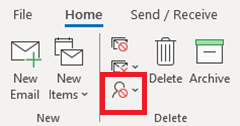
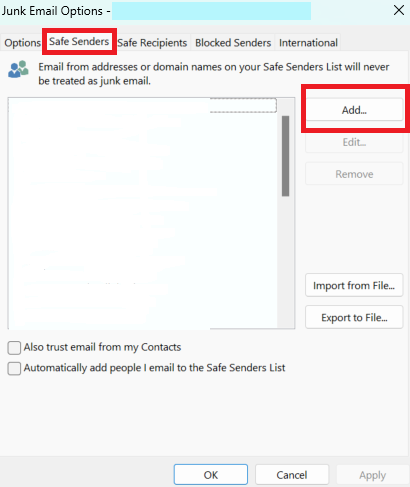
To ensure that you continue to receive emails from Resolution Life, you can add us to your Safe Senders List by following these easy steps:
1. On the Home tab, click Junk, and then click Junk E-mail options
2. On the Safe Senders tab, click Add and insert noreply@resolutionlife.com.au
Note: the instructions above are specific to Microsoft Outlook.
Important information
Where the information on this website is factual information only, it does not contain any financial product advice or make any recommendations about a financial product or service being right for you. Any advice is provided by Resolution Life Australasia Limited ABN 84 079 300 379, AFSL No. 233671 (Resolution Life), is general advice and does not take into account your objectives, financial situation or needs. Before acting on this advice, you should consider the appropriateness of the advice having regard to your objectives, financial situation and needs, as well as the product disclosure statement and policy document for the product. Any guarantee offered in the product is only provided by Resolution Life. Any Target Market Determinations for our products can be found at resolutionlife.com.au/target-market-determinations.
Resolution Life does not make any representation or warranty as to the accuracy, reliability or completeness of material on this website nor accepts any liability or responsibility for any acts or decisions based on such information.
The contact details for Resolution Life can be found at resolutionlife.com.au/contact-us.